Must Read for Event Photographers using Facebook
How to use Facebook for an Event to Create Sales
Contents
- Why Use Facebook?
- What to Post on Facebook BEFORE an Event
- What to post to Facebook DURING an Event Photography job
- What to post to Facebook AFTER an event
- Other Facebook Event Photography Post Ideas
Why Use Facebook?
Facebook is a great free tool to help promote your photography and create sales. We often see photographers post about how to buy images AFTER an event, the biggest tip we can share is the sales process starts BEFORE you even shoot your event.
These Facebook tips are for event photography, not portrait photography since portraits usually imply one purchaser. Event photography implies many customers need to be able to access images and purchase separately. Event photography includes a wide range of specialties, this can be livestock shows, rodeos, fairs, corporate gatherings, sports, and more.
If you don’t have a Facebook Page, set one up! It’s relatively easy and free. There are many tutorials on how to do this, take the time and get it done!
These tips are for seasoned and new photographers. If you booked an event photography job, these Facebook tips are for you!
What to Post on Facebook BEFORE an Event
- Ask the event manager to confirm their Facebook page, sometimes they have more than 1 page or an old one not being used so confirm what is correct.
- Provide the event with your Facebook page and website store link, informing them that the website is where customers will purchase their images.
- Ask them to share your Facebook page and store website address on a post before, during, and/or after the event to help attendees find their photos. TIP: create an image and text for them to share, it’s one less thing for the event manager to do and they are more likely to share your information. Example below.
- Find their Facebook page and follow it, like it, and comment on posts about the event you are attending. Commenting is one way for their followers to see that you are a photographer and know where they can buy images. For example you can comment: “We are very excited to be photographing this event, follow our Facebook page to get notifications when photos are posted”. This is not required but recommended.
- Pre-Schedule posts via Facebook Planner. You can create these posts the day of the event but that is a lot of work when you are also photographing. Use the tools Facebook provides. There are many tutorials on how to schedule posts on Facebook, check them out and get it done. This will make finding your images easier for exhibitors and attendees which will increase your sales.
- A week or more prior to the event announce that you are shooting at the event, tag the event Facebook page.
Example Facebook post for an Event to Share on their page. You can create designs like this for free with services like Canva. Link to this free design can be found HERE.
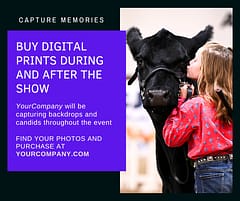
Providing your details to an event is to help them and their customers. They do not have to share, you are merely trying to make their jobs easier and provide the best customer experience for the attendees. Don’t have time to create an image? That’s okay, you can also only use text giving details about the show and how to find and purchase images (including your website), Facebook will automatically create an image based off your website link.
What to post to Facebook DURING an Event Photography job
- Day one is pre-scheduled because you are busy - tag the event and include your PhotoServe website link so people know where to buy images. ALWAYS include a link to your store website in the Post so people can easily find their images.
- TIP: DO NOT POST ALL YOUR IMAGES ON FACEBOOK, people will screen grab them and not buy them. Post one or two images of the day and a link to where to find them to purchase. Or only post the folder website address and it will auto create an image on Facebook. The direct folder link allows attendees to find images easily and quickly vs going to your home page and having to find their album.
- If it is a multi-day event, continue to share a watermarked memorable image per day with the direct website link to the event folder(s) so attendees can click to view and purchase.
What to post to Facebook AFTER an event
- Once all images are uploaded, share the link one more time announcing all images are available for viewing and purchase.
- Tag the event and any other relevant Facebook pages - such as associations that were there, the location, etc. Use hashtags for the event if they have one.
Other Facebook Event Photography Post Ideas
- Details about any discounts on image bundles.
- Inform people that they are purchasing high-quality digital images that they can use for their marketing, social media, or choose to print at their preferred location.
- How long images are for sale if you only keep them available for a limited time - event image sales happen during or shortly after events, they rarely happen even 2 months after an event. You are trying to capture as many sales close to the event as possible since people don’t tend to purchase later. Having your images up for 4 months and notifying customers of the timeline to purchase usually helps sales as people know they can’t keep coming back to the site to view the images and never make a purchase.
If you want to learn more about Facebook there are tons of resources available. When you use Facebook remember to show who you are, what you have to offer and make links to your events easy for people to find!