
Using Stripe Payment Processing for a Photography Business
Why, how and resources for using Stripe to get paid!
Contents
- What is Stripe
- Why PhotoServe Uses Stripe
- How to Set Up a Stripe Account with PhotoServe
- What is Stripe Account Country?
- What You Need to Activate a Stripe Account
- Setting up Sales Taxes
- Monitor your tax reporting obligations
- Setting Up Customer Receipts
- The Cost of Stripe
- Stripe provides your business with:
What is Stripe
Payments infrastructure for the internet. Millions of businesses of all sizes—from startups to large enterprises—use Stripe’s software and APIs to accept payments, send payouts, and manage their businesses online. Companies using Stripe that you might be familiar with include Skip the Dishes, Shopify, Toyota and Zoom.

Why PhotoServe Uses Stripe
All payment details are secure and never seen by us. When a customer makes a sale through your PhotoServe website the money goes directly into your Stripe account and directly pays PhotoServe our portion. Many e-commerce services add another step making it longer for photographers to see their earnings, after a sale the money goes into their business and they decide when payments can be made with minimum amounts and payment schedule restrictions. With Stripe you have control. Stripe makes it easy for photographers to manage their payments while staying compliant with taxes.
How to Set Up a Stripe Account with PhotoServe
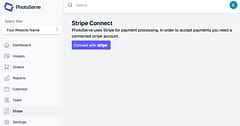
Log into PhotoServe, click on your website, on the left menu bar Stripe is listed. Click on Stripe. It will take you to Stripe’s website to set up your account.
What is Stripe Account Country?
Set up your Stripe account for where you Business Tax ID is, if you do business in the USA and your banking is in the USA you create a Stripe account for the USA.
Stripe supports multiple currencies so you can set prices in whatever currency you want. Sometimes it makes sense to have prices defined in more than one currency to account for local market conditions and also avoid exchange rate fluctuations impacting what you charge and receive (and so you can have the nice psychological “.99” type price points). If the customer uses a payment method for a different currency, Stripe will handle the conversion for you but there is a small fee for that. For event based photography, it’s often unusual as customers are usually in the country you’re taking and selling the photos.
If you are based in Canada but also do business in the USA you can have one Stripe account that can deposit into both CAD and USD denominated bank accounts which would allow you to accept both currencies directly and choose when to do the conversion yourself.
What You Need to Activate a Stripe Account
Stripe needs to verify and activate your identity and account information. This information is required by regulators and helps prevent abuses in the financial system. They are often referred to aa KYC (Know Your Customer) and AML (Anti Money Laundering) rules. Each country has its own set of regulations. If you want more than one person attached to the account Stripe has a share link for another to fill out the information required.
You may need: Business Account Number Address Type of Business Contact Information Banking Information
Setting up Sales Taxes
Internet businesses are required to collect sales taxes in many countries and regions. Staying compliant can be challenging, especially as your business grows. Tax rules and rates change constantly, and they vary based on what and where you sell. If you ignore these complexities, you risk paying penalties and interest on top of uncollected taxes. Good news - Stripe Tax is built to simplify tax compliance, so you can focus on scaling your business.
Stripe Tax automatically calculates and collects sales tax on both physical and digital goods and services. Learn more about Stripe Tax info here.
Stripe will automatically calculate the sales tax to apply to an order based on the customers location and the registered sales tax jurisdictions you have registered with them. We can’t tell you what your obliged to register, we just enable the technical pieces to work (and you’re responsible for remitting your sales taxes).
Monitor your tax reporting obligations
Stripe Tax provides insights about your potential tax registration obligations (called economic nexus in the US). Stripe helps you understand where you might have to register, collect, and remit tax based on your sales into a state or country, even if you don’t have a physical presence. Under Monitor tax thresholds, you can see the list of locations where you haven’t yet added a registration but might be selling into. For more information about tax monitoring.
Setting Up Customer Receipts
Stripe can automatically send branded email receipts after a successful payment. Set this up once and you don’t have to worry about it again.
Log into Stripe and go email receipt settings and upload a custom logo in the branding settings. Receipts also include any public information that you have specified in your account details, such as your phone number or website address. Here you’ll also be able to opt-out of including your support phone number on receipts. This setting also determines whether or not your support phone number appears on other customer facing documents like the invoice email, invoice PDF, and hosted invoice page.
To see how a receipt looks when it is sent, click Send Test Email to yourself.
Further info about Stripe receipts.
Our platform also sends an order confirmation email containing the links for a customer to download their images, in case they don’t do it immediately after purchase.
The Cost of Stripe
- Stripe’s basic fee is 2.9% + $0.30c
- See Stripe Pricing for complete pricing and fees
Stripe provides your business with:
- Everything you need to manage payments
- Get hundreds of feature updates each year
- No setup fees, monthly fees, or hidden fees
- 24×7 phone, chat, and email support
- Comprehensive security and rigorous compliance
- Fast, predictable payouts to your bank accounts
Stripe (https://stripe.com/en-ca) has many articles, videos and resources to answer your questions or learn how to utilize the tool more efficiently.